


Key Takeaways
CryptoPanic is an aggregator, not a publisher. It collects headlines from crypto media, Reddit, X and YouTube into one filterable feed and layers community sentiment votes on top, so you read one page instead of thirty.
The features most people actually need are free. Coin filters, sentiment filters, source following, saved posts and manual portfolio tracking all sit on the free tier. The paid tier mainly adds automation, custom sources and an ad-free interface.
Sentiment votes are a crowd signal, not analysis. A high vote count tells you a story is getting attention. It does not tell you the story is true, important or priced in, and CryptoPanic does not verify what it aggregates.
What Is CryptoPanic?
CryptoPanic is a cryptocurrency news aggregator that pulls headlines from a wide range of sources into a single real-time feed. It was launched in 2017 by Latvian developer Kaspars Sprogis and has stayed a small, independently run project rather than a venture-funded media company.
The core idea is simple. Crypto news is scattered across dozens of publications, subreddits, X accounts and YouTube channels. CryptoPanic subscribes to all of them, timestamps every item, tags it with the coins it mentions and puts it in one scrollable column. You are not reading full articles on CryptoPanic. You are scanning headlines and clicking through to the original source.
The second idea is the one that gives the site its identity. Logged-in users can vote on each headline as bullish, bearish, important, saved, toxic or "lol." Those votes are aggregated into a visible signal next to each item, and CryptoPanic also publishes an attention metric it calls the Panic Score, which measures how much engagement a story is generating relative to a time window rather than whether the news is good or bad.
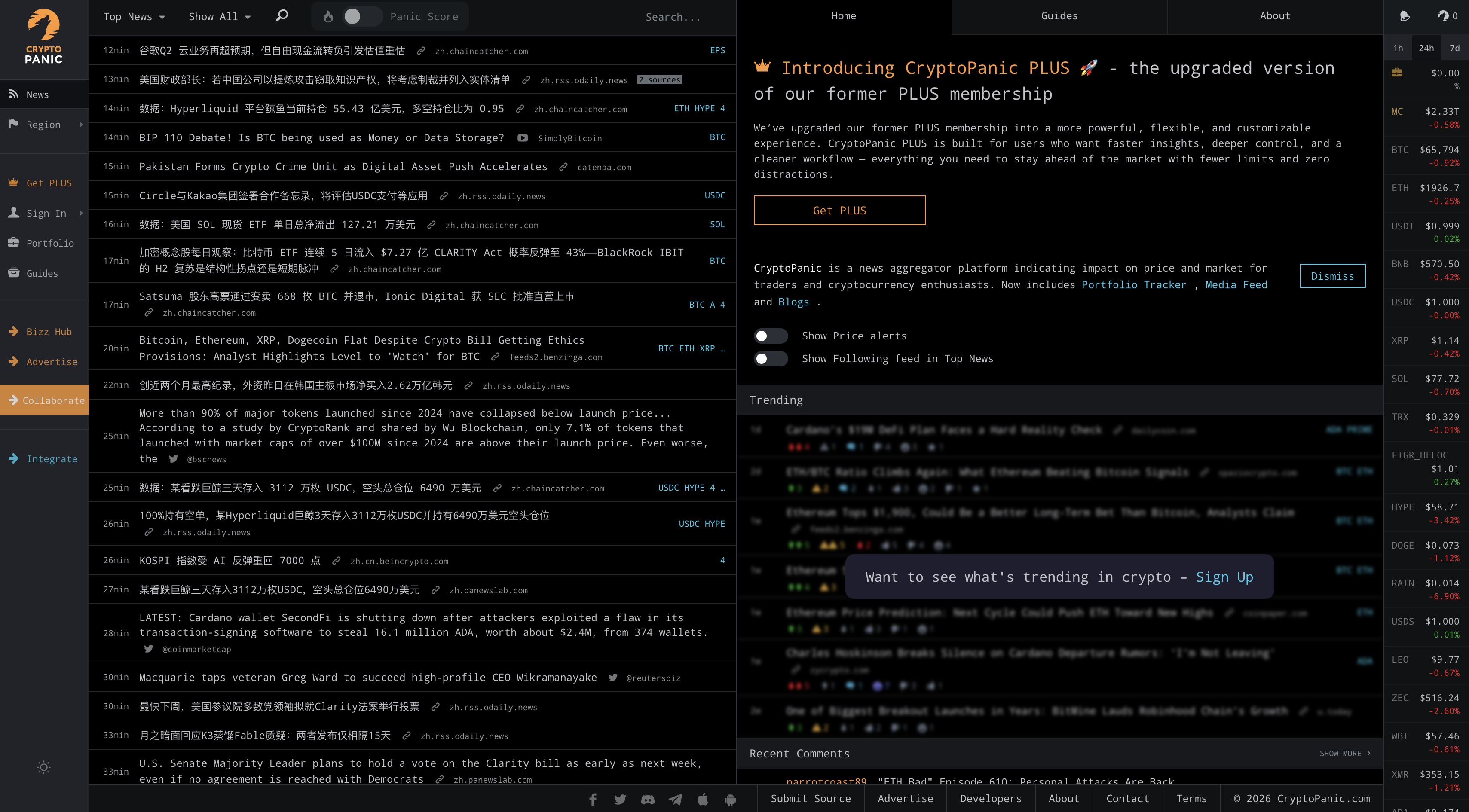
It is worth being clear about what CryptoPanic is not. It does not write original reporting, it does not fact-check the sources it aggregates, and the vote counts are crowd opinion rather than editorial judgement. Treat it as a monitoring tool that saves you time, not as a source of truth.
How CryptoPanic Works
Understanding the pipeline makes the interface much easier to read.
Ingestion. CryptoPanic monitors RSS feeds, APIs and social accounts from more than fifty sources, including major crypto news outlets, exchange announcement blogs, Reddit communities and selected X accounts.
Tagging. Each item is matched against a list of assets, so a story mentioning Ethereum is tagged ETH and appears when you filter for that coin.
Community voting. Registered users apply sentiment votes. These are visible on the headline and can be used as a filter.
Scoring. The Panic Score estimates how much attention a story is attracting across the wider internet, which is used to surface trending items.
Distribution. The same feed is delivered through the website, iOS and Android apps, embeddable widgets, RSS output, chat bots and a developer API.
Because everything is a filter applied to one underlying feed, learning the filters is most of the learning curve.
CryptoPanic Filters Explained
Filters are the single most useful part of the product and the part new users most often ignore. They appear as tabs above the feed and are also exposed as parameters in the API.
Filter | What it shows | When it is useful |
|---|---|---|
Rising | Stories gaining votes and engagement quickly right now | Catching a developing story early in the cycle |
Hot | Stories with the highest overall engagement in the recent window | A quick catch-up after being away for a few hours |
Bullish | Items the community has voted as positive for price | Seeing what optimistic narratives are circulating |
Bearish | Items voted as negative for price | Risk monitoring and spotting emerging concerns |
Important | Items flagged as materially significant regardless of direction | Filtering regulatory, security and infrastructure news |
Saved | Your own bookmarked items | Building a reading list or research folder |
LOL | Items voted as jokes, memes or low-quality noise | Mostly useful as a way to see what to ignore |
Filters stack with other controls. You can combine a coin filter with a sentiment filter to get, for example, only bearish-voted Solana headlines from the past day. You can also filter by region and language, with support for English, German, Dutch, Spanish, French, Italian, Portuguese, Russian, Turkish, Arabic, Chinese, Japanese and Korean.
One caution on sentiment filters. A "bullish" tag means people voted bullish, not that the news is good. Vote counts are easily skewed by whichever community is most active on a given asset, and thinly covered tokens will have very few votes at all. Use these filters to find stories faster, not to decide what a story means.
Following Coins and Managing Sources
Beyond filters, CryptoPanic lets you shape the feed itself. You can follow specific coins so their news is prioritised, and you can follow or mute individual publications.
Follow coins to build a watchlist-driven feed rather than a general one.
Disable sources you find low quality, which materially improves signal on a busy day.
Switch between all news, followed coins only, and portfolio-linked news.
Toggle the media type, so you can hide video content or Reddit threads if they clutter your feed.
This is where the product earns its keep for regular users. A default CryptoPanic feed is noisy. A configured one is genuinely efficient.
Portfolio Tracking
CryptoPanic includes a portfolio tracker that connects your holdings to the news feed. Holdings can be entered manually on the free tier, and the platform also supports read-only API imports from more than ten exchanges for automatic updates on the paid tier.
The value is not the portfolio maths, which is basic compared with dedicated trackers. The value is that the feed can be filtered down to news that mentions only the assets you actually hold.
A practical security note: if you connect an exchange, only ever generate a read-only API key with trading and withdrawal permissions disabled. Any tool that asks for withdrawal access to display a balance is asking for far more than it needs. This applies to every portfolio tracker, not just this one.
Alerts and Notifications
Alerts are the main reason people upgrade. CryptoPanic can push notifications when news breaks for specific coins, rather than requiring you to sit on the feed.
Alert type | How it works | Notes |
|---|---|---|
Coin news alerts | Notifies you when a followed asset appears in a new headline | Instant delivery is a paid feature; free accounts see delayed or batched updates |
Email digests | Periodic summary of feed activity sent to your inbox | Lower urgency, useful for daily review rather than monitoring |
Mobile push | Notifications through the iOS and Android apps | Requires the app and notification permissions |
Chat bots | Posts trending news into Telegram, Discord, Slack or Rocket.Chat | Popular for communities and small teams sharing a feed |
RSS output | Any filtered feed can be exported as an RSS or Atom feed | Free and flexible; works with any reader or automation tool |
The RSS option is underrated. Because filters can be encoded into the feed URL, you can build a narrow feed such as "important news about Bitcoin only" and pipe it into a reader, a Notion database or an automation tool without paying for anything.
CryptoPanic Free vs Paid: What You Actually Get
CryptoPanic has run its paid tier under a few names over the years, including PRO and more recently PLUS. The feature split below reflects how the tiers have been described by the platform. Pricing has been widely reported at roughly nine US dollars per month or ninety-nine US dollars per year, but subscription pricing changes, so check the current rate on the site before subscribing.
Feature | Free | Paid tier |
|---|---|---|
Core news aggregation | Yes | Yes |
Voting, commenting and polls | Yes | Yes |
Filters and feed customisation | Yes | Yes |
Following coins and sources | Yes | Yes |
Manual portfolio tracking | Yes | Yes |
Automated portfolio sync via exchange APIs | No | Yes |
Custom RSS and Atom sources | No | Yes |
Custom Reddit and X sources | No | Yes |
Instant per-coin news alerts | Limited | Yes |
Extended API access and metadata fields | Limited | Yes |
Advertisements | Shown | Removed |
The honest summary is that the free tier covers the reading experience and the paid tier covers automation. If you check crypto news a few times a day, free is enough. If you are running a desk, a community or a research workflow where being twenty minutes late matters, the paid tier starts to justify itself.
The CryptoPanic API
CryptoPanic offers a REST API that returns the same aggregated feed in structured form. It is widely used in trading dashboards, sentiment research, Telegram bots and, more recently, AI agent tooling, since community-built connectors expose the feed to AI assistants.
An important 2026 change: CryptoPanic has discontinued its free Developer API plan, with the platform stating it would be removed on 1 April 2026. Programmatic access now requires a paid plan. Older tutorials that tell you to grab a free token are out of date.
Plan tier | Typical access | Suited to |
|---|---|---|
Developer | Posts endpoint, coin and filter parameters, lower rate limits | Personal projects, prototypes, small bots |
Growth | Adds the portfolio endpoint and higher request ceilings | Production apps and dashboards with real traffic |
Enterprise | Adds full-text content processing, incremental pulls and advanced sorting by impact, similarity and market cap | Data vendors, quantitative research, large platforms |
Requests authenticate with an auth token passed as a query parameter, and rate limiting operates on two layers: a per-second request cap and a monthly request cap. Exceeding either returns an error rather than throttling silently. The API also supports an RSS output format, though that response is capped at twenty items regardless of plan.
Two things developers should plan around. The feed is oriented toward current news, with cursor-based pagination rather than date-range queries, so historical archives are not straightforward to pull. And CryptoPanic applies server-side caching, so polling more often than roughly every thirty seconds returns the same data while consuming your quota.
How to Set Up CryptoPanic in Five Minutes
Create a free CryptoPanic account. Voting, saving and following all require being logged in, and the feed is far less useful without them.
Follow your assets. Add the coins you actually care about so the feed prioritises them instead of showing everything.
Prune your sources. Spend a few minutes disabling outlets you do not trust or find repetitive. This is the highest-impact setup step.
Learn two filters. Most people only need Important and Rising. Important surfaces regulation, security and infrastructure news. Rising catches developing stories.
Set up one output. Either enable mobile push for your top coins, or generate a filtered RSS feed and send it to your reader or chat channel.
Optional sixth step: if you use a portfolio tracker elsewhere, do not duplicate it here. Use CryptoPanic for news and keep accounting in a dedicated tool.
Strengths and Limitations
What CryptoPanic does well
Speed. Headlines often appear here before they surface in mainstream aggregators.
Breadth. Coverage spans mainstream outlets, exchange blogs, Reddit and X in one place.
Filtering depth. Coin, sentiment, source, media type, region and language filters all compose.
Flexible output. RSS, widgets, chat bots and an API mean the data does not have to stay on the site.
Low friction. The free tier is genuinely usable and does not require an account to browse.
Where it falls short
No editorial verification. Aggregation is indiscriminate, so low-quality and promotional sources appear alongside credible ones until you mute them.
Vote manipulation risk. Sentiment counts on small-cap tokens can be moved by a handful of motivated users.
Dated interface. The layout is information-dense and functional rather than modern, which some users find cluttered.
Shallow analytics. Portfolio and charting features are basic next to dedicated tools.
Weak historical access. The product is built for now, not for archival research.
Free API removed. A previously free integration path is now paid, which affects hobbyist projects.
CryptoPanic vs Alternatives
CryptoPanic competes with two different kinds of product: other aggregators, and the publications it aggregates. They serve different jobs.
Platform | What it is | Main strength | Main limitation |
|---|---|---|---|
Aggregator with community sentiment voting | Speed, filtering and broad source coverage in one feed | No verification, dated interface, paid API | |
Original news publisher with an editorial team | Reported journalism and accountability for accuracy | Single perspective; you still need other sources | |
Original news publisher | High output and strong search visibility | Variable depth; not an aggregator | |
Research-led news outlet | Data and institutional coverage depth | Much of the best material sits behind a paywall | |
News section attached to a market data platform | Convenient if you already use it for prices | Thinner aggregation and fewer filters | |
News feed inside a market data platform | Tight integration with price pages | Less configurable and less real-time | |
General-purpose news aggregator | Free, familiar and wide reach | No coin tagging, no sentiment layer, weaker crypto coverage |
The practical takeaway is that these are complements, not substitutes. CryptoPanic tells you quickly that something is happening. A publisher such as CoinDesk or The Block tells you whether it actually happened and what it means. Using an aggregator alone leaves you exposed to unverified claims; using a single publisher alone leaves you slow and narrow.
Who Should Use CryptoPanic?
User type | Verdict |
|---|---|
Complete beginner | Useful, but configure it first. An unfiltered feed is overwhelming and mixes credible reporting with promotional noise. |
Intermediate user | Strong fit. This is the group that benefits most from source pruning, coin follows and filtered RSS. |
Active trader | Good as a monitoring layer. The paid alerts are the main draw, though most serious desks combine it with direct source monitoring. |
Developer or researcher | Viable data source, but budget for the API now that the free tier has been removed. |
Community or newsletter operator | The chat bot and RSS integrations make it a low-effort way to feed a channel. |
CryptoPanic is a mature, focused tool that does one job well: getting a lot of crypto information in front of you quickly and letting you cut it down to what you care about. It does not interpret that information for you, and it should not be treated as though it does. Nothing on the platform, including its sentiment votes and Panic Score, constitutes financial advice or a signal about future prices.
Frequently Asked Questions
Is CryptoPanic free?
Yes. The core feed, filters, voting, coin following and manual portfolio tracking are available on a free account, with advertising displayed. A paid tier adds automation, custom sources, instant alerts and an ad-free interface.
Is CryptoPanic safe to use?
The site itself is a long-running, established product. The main risk is not the platform but the content it aggregates, which is not verified. If you connect an exchange for portfolio tracking, use read-only API keys with withdrawal permissions disabled.
What is the Panic Score?
It is CryptoPanic’s attention metric. It estimates how much engagement a story is generating across the internet within a time window, which is used to rank trending news. It measures attention, not accuracy or price impact.
What do the bullish and bearish tags mean?
They reflect how registered users voted on a headline. They are crowd opinion, not analysis, and can be skewed on assets with small or highly motivated communities.
Does CryptoPanic still have a free API?
No. The platform announced that its free Developer API plan was discontinued and would be removed on 1 April 2026. Programmatic access now requires a paid plan. Check the current plan list on the developer pages, as tiers and limits change.
Can I get CryptoPanic news as an RSS feed?
Yes. Filtered feeds can be exported in RSS or Atom format, which is one of the most useful free features. Note that RSS responses are capped at twenty items per request.
Does CryptoPanic have a mobile app?
Yes, applications are available for both iOS and Android, and they support push notifications.
CryptoPanic vs CoinDesk: which is better?
They do different jobs. CryptoPanic aggregates and filters headlines from many outlets, including CoinDesk. CoinDesk produces original, edited reporting. Most people use an aggregator for discovery and a publisher for verification.
Can CryptoPanic predict price movements?
No. Its sentiment votes and Panic Score describe attention and community opinion about news that has already been published. They are not forecasts, and nothing on the platform should be treated as financial advice.
Disclaimer: This content is for educational and informational purposes only and is not financial advice. Nothing here is a recommendation to buy or sell any asset or use any platform. Do your own research and manage your risk.
How to Cash Out Crypto in Dubai in 2026
How to Get Started on Robinhood Chain: A Complete Beginner's Guide
Best Robinhood Chain Trading Platforms in 2026: FOMO, GMGN, Uniswap and OpenSea Compared
Need deeper training?
Join our structured modules with live examples and expert checklists for effective implementation.
JOIN THE ACADEMY