Key Takeaways
You don't need a Robinhood brokerage account to use Robinhood Chain. Any Ethereum-compatible wallet, like MetaMask, connects to it directly.
The simplest way to get on board is a Uniswap cross-chain swap, which bridges your funds and swaps them in one step. Across Protocol is the more hands-on alternative if you want a dedicated bridge.
Always keep a little ETH for gas fees, double-check every token contract before buying, and start with a small test amount while you learn.
Getting Started
Robinhood Chain is live, and if you've never touched a blockchain before, jumping in can feel a little overwhelming at first. You might be wondering whether you need a Robinhood account, which wallet to pick, why everyone keeps mentioning ETH, and what "bridging" even means.
Here's the reassuring part: using a blockchain has gotten a lot friendlier over the years. You no longer have to understand every technical detail before you can move your funds onto a new network. You just need to follow a few clear steps.
In this guide, we'll walk you through two ways to get onto Robinhood Chain:
The easiest method: a cross-chain swap through Uniswap.
The traditional method: adding Robinhood Chain manually and bridging with Across Protocol.
By the time you're done, you'll have a wallet connected to Robinhood Chain and a clear idea of where to trade your first token.
Important: Robinhood Chain is an open blockchain. Just because a token shows up on the network doesn't mean Robinhood created, reviewed, or endorsed it. Brand-new tokens can be extremely risky, so treat them with caution. |
What Is Robinhood Chain?
Robinhood Chain is a public Ethereum Layer 2 network built with Arbitrum technology. That sounds technical, but the idea behind it is pretty simple.
Ethereum is one of the most widely used blockchains in the world. It's secure and well established, but when a lot of people are transacting at once, using it directly can get slow and expensive. A Layer 2 handles transactions more efficiently while still leaning on Ethereum for its underlying security and settlement.
Think of Ethereum as a busy main road through a city. Robinhood Chain is like an express lane built alongside it, designed to move traffic faster and at a lower cost.
Here's what that means for you in plain terms:
It works with Ethereum wallets and apps.
It uses ETH to pay network fees.
It supports smart contracts and decentralized apps.
Anyone can interact with the network.
Its mainnet Chain ID is 4663.
Robinhood launched its public mainnet on July 1, 2026, with Uniswap available from day one as the network's main public automated market maker.
Do You Need a Robinhood Brokerage Account?
No, you don't. You don't need a Robinhood brokerage account just to use Robinhood Chain.
The chain is permissionless, which simply means you can connect a compatible self-custody wallet and start using public apps directly. That said, certain products, especially regulated or tokenized financial assets, may come with country, identity, or eligibility restrictions. Using the blockchain isn't the same as having access to every asset or service built on top of it.
What You Need Before You Start
There are four things to have ready before you begin:
What you need | Why it matters |
|---|---|
A compatible crypto wallet | This is how you hold your assets and approve transactions. |
A small amount of crypto to transfer | You'll move this onto the network as your test run. |
ETH on Robinhood Chain | This pays your network (gas) fees once you're on the chain. |
The official websites for your tools | Bookmark them so you never fall for a fake copycat site. |
Our advice: start with a small test amount. There's no need to move your whole portfolio while you're still learning the ropes.
Step 1: Set Up a Wallet
A crypto wallet is an app that lets you hold assets and approve transactions on a blockchain. For this guide, we recommend MetaMask, because it's widely supported and makes adding custom Ethereum-compatible networks easy. Other EVM-compatible wallets can work too, including Rabby and supported versions of Phantom.
Only download your wallet from its official website or a verified app-store listing. During setup, the wallet gives you a recovery phrase. That phrase controls your entire wallet, so protect it carefully. You should never:
Take an unprotected screenshot of it.
Save it in an email draft.
Send it to "support."
Type it into a bridge or trading platform.
Share it with anyone, ever.
A legitimate app may ask you to connect your wallet or approve a transaction. It will never need your recovery phrase.
Step 2: Open MetaMask's Network Settings
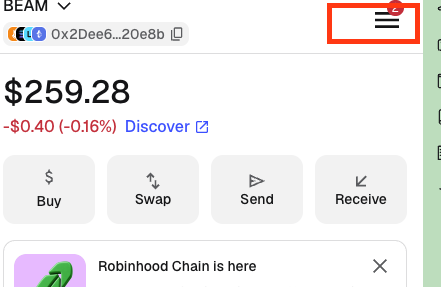
Open MetaMask and tap the three horizontal lines in the top-left or top-right area of the interface, depending on your device and app version.
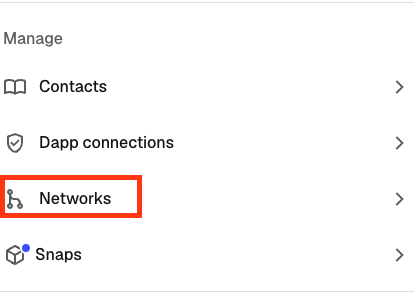
Select Networks inside MetaMask
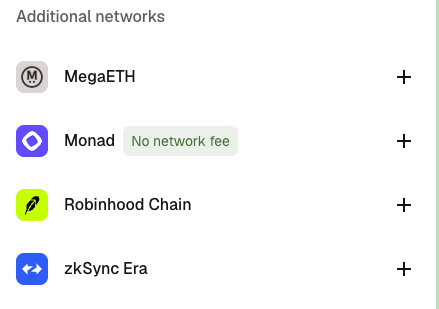
MetaMask may already list Robinhood Chain under additional networks. If it appears, select the add button and verify the information before approving it.
Find Robinhood Chain in MetaMask’s network list
If Robinhood Chain does not appear automatically, you can add it manually.
Robinhood Chain Network Settings
Use the current official mainnet configuration:
Setting | Robinhood Chain mainnet |
|---|---|
Network name | Robinhood Chain |
Chain ID | 4663 |
RPC URL | |
Currency symbol | ETH |
Block explorer |
Robinhood also runs a test network with Chain ID 46630. If you're moving real assets, be careful not to mix up the testnet with the public mainnet. Always confirm these details against Robinhood's official documentation before adding them. A random RPC address copied from social media can mislead your wallet or leak information about your activity.
Why Do You Need ETH?
Robinhood Chain uses ETH as its gas token. "Gas" is just the small network fee you pay whenever you make an on-chain transaction. You may need ETH to:
Swap one token for another.
Approve a token.
Use a decentralized app.
Move assets around.
Interact with a smart contract.
Having USDC in your wallet isn't always enough. Keep a small ETH balance on hand so you can always cover fees.
Method 1: Use a Uniswap Cross-Chain Swap
For most beginners, this is the easiest route. In the old days, getting onto a new chain meant doing two separate jobs: first bridging an asset to the new network, then opening a decentralized exchange to swap it. Uniswap rolls those two steps into a single cross-chain transaction.
Instead of opening a separate bridge, you just pick the asset and network you're sending from, then choose the asset and Robinhood Chain as your destination. Uniswap works out the route behind the scenes.
Step 1: Open Uniswap
Go to the official Uniswap web app and connect your MetaMask wallet. Check the web address carefully, because fake Uniswap sites are common.
Step 2: Choose Your Starting Asset and Network
On the Sell side, pick the asset you already own and the network it currently sits on. For example:
ETH on Ethereum.
USDC on Ethereum.
Another supported asset and network shown in Uniswap.
Step 3: Choose Robinhood Chain as the Destination
On the Buy side, select Robinhood Chain.
You may see the Robinhood logo next to the destination network.
Select Robinhood Chain as the destination network in Uniswap
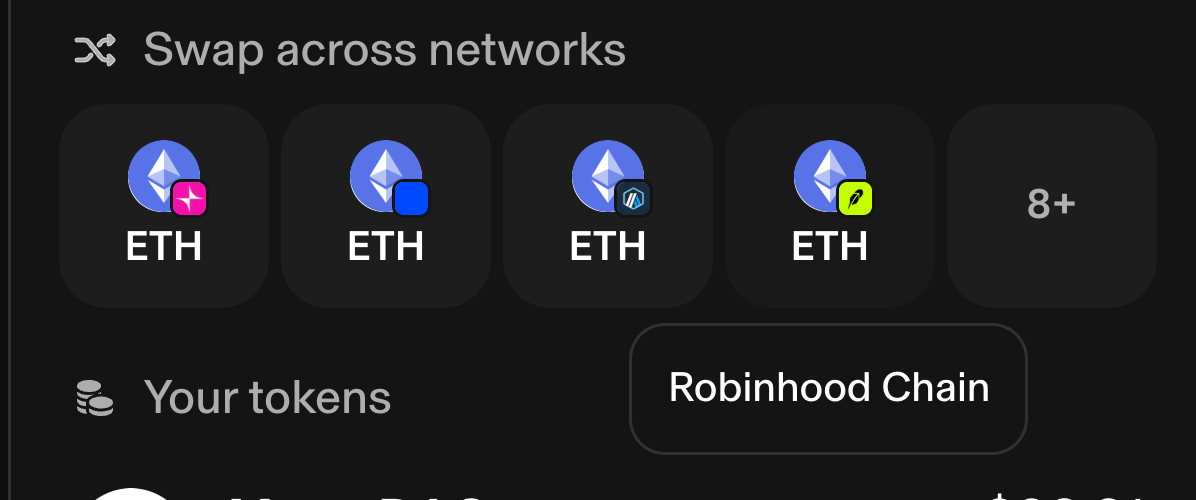
In the example below, the user is sending ETH from Ethereum and receiving ETH on Robinhood Chain.
Set up an Ethereum-to-Robinhood Chain cross-chain swap in Uniswap
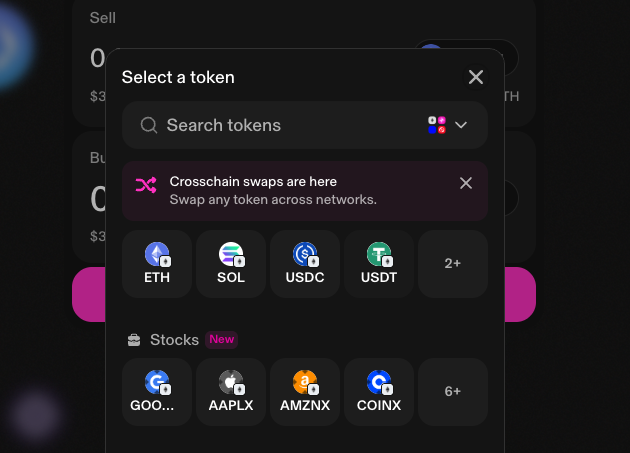
This is effectively a bridge, but the experience feels like a normal swap.
Step 4: Review the Route
Before you confirm anything, take a moment to review:
The asset you're sending.
The source network.
The asset you'll receive.
Robinhood Chain as the destination.
The estimated fees.
The minimum amount you'll receive.
The estimated completion time.
The receiving wallet address.
Don't just tap approve because the button is there. Read what your wallet is actually asking you to sign.
Review and confirm the cross-chain transaction in Uniswap
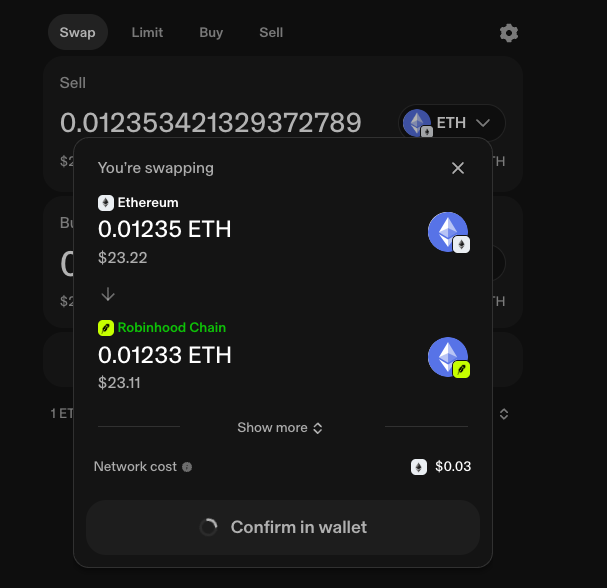
Step 5: Confirm in MetaMask
MetaMask will open a confirmation window.
Review the network, amount and estimated fee, then approve the transaction.
Cross-chain transfers can take longer than a regular swap because the asset must move between networks. Do not repeat the transaction immediately because the balance has not appeared after a few seconds.
Use the transaction link or block explorer to follow its status.
Step 6: Check Your Robinhood Chain Balance
Switch MetaMask to Robinhood Chain.
Your destination asset should appear after the transfer completes.
When receiving a token other than ETH, the balance may not display automatically. You may need to import the verified token contract into the wallet.
Do not search only by token name. Scammers regularly create fake tokens using legitimate names and symbols.
Why We Recommend the Uniswap Method
The Uniswap method is easier because it removes an entire app from the process. You don't have to:
Visit a bridge first.
Complete one transaction.
Wait around.
Switch websites.
Then make a second swap.
Uniswap is also well established and supports Robinhood Chain through its web app, wallet, and API. It's still an on-chain transaction, and bridge risks haven't magically disappeared. The complexity is simply tucked behind a cleaner interface.
Method 2: Bridge Manually With Across Protocol
Across Protocol is handy if you'd rather use a dedicated bridge or want more control over the route. Across supports Robinhood Chain through its bridge and swap infrastructure.
Step 1: Add Robinhood Chain to Your Wallet
Use the official settings listed earlier in this guide. Your wallet can be MetaMask, Rabby, or another compatible EVM wallet.
Step 2: Open Across
Visit the official Across website at https://across.to/ and connect your wallet.
Step 3: Choose the Origin
Select the network where your funds currently sit, such as Ethereum, Base, Arbitrum, or another network Across supports. Then pick the asset you want to move.
Step 4: Choose Robinhood as the Destination
Set Robinhood as the destination network.
Choose Robinhood Chain as the destination in Across Protocol.
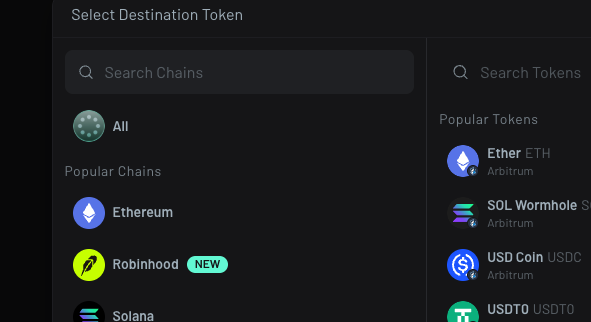
Enter the amount you want to transfer.
Across should show the expected destination amount, fees and route before you confirm.
Step 5: Approve and Bridge
Some tokens need an approval transaction before the bridge can move them. An approval gives the bridge contract permission to spend a specified token from your wallet, so review the amount carefully and avoid granting unlimited approval when you don't need to. Once approved, confirm the actual bridge transaction.
Step 6: Verify the Arrival
Switch your wallet to Robinhood Chain and check the official block explorer. The explorer is useful because it shows the blockchain record even when your wallet interface hasn't refreshed yet.
Uniswap or Across: Which Should You Use?
Method | Best for | Main advantage |
|---|---|---|
Uniswap cross-chain swap | Most beginners | Bridges and swaps through one interface |
Across Protocol | Those who want a dedicated bridge | More direct control over the bridge route |
Use Uniswap when your desired asset and route are supported and you just want the simplest experience. Reach for Across when you specifically want to bridge, compare the quoted destination amount, or use a route that isn't available through Uniswap. The cheapest option can shift depending on network conditions, the asset, the size, and available liquidity, so compare the final amount you'll actually receive, not just the advertised fee.
What Should You Do After Moving Funds?
Once your assets land, you've got three broad options.
Keep Some ETH for Fees
Don't swap away your entire ETH balance. Leave enough to cover future transactions. Without ETH, you might own other tokens but be unable to move or sell them.
Swap Into USDC or Another Supported Asset
You can use Uniswap to exchange ETH for a supported stablecoin on Robinhood Chain. A stablecoin like USDC is designed to track a fiat currency, but it still carries issuer, smart-contract, and liquidity risks. Verify the contract before you buy.
Connect to a Trading Platform
For discovering and trading Robinhood Chain tokens, our preferred platform is FOMO. FOMO is built to simplify onboarding and managing your money across chains. Eligible users can fund through familiar payment methods like Apple Pay, and the platform cuts down on juggling separate balances and manual bridges. That makes it a strong pick for beginners and for experienced users who just want a cleaner mobile experience.
Start with FOMO:
For advanced trading, wallet tracking, and new-token research, use GMGN. GMGN gives you charts, smart-wallet info, social tracking, token discovery, and more control than a simplified trading app.
Open GMGN:
Once you're in GMGN, switch the selected network to Robinhood Chain before trading.
Common Beginner Mistakes
A few slip-ups trip up almost everyone at first. Here's what to watch for:
Mistake | How to avoid it |
|---|---|
Sending an asset over the wrong network | The wallet address can look identical across Ethereum-compatible networks, but funds may land on a chain you didn't intend. Always confirm both the token and the network. |
Confusing mainnet and testnet | Mainnet uses Chain ID 4663; the testnet uses 46630. Testnet tokens have no normal market value. |
Moving every last bit of ETH | Keep some ETH set aside for gas. |
Buying a token by name alone | Names and logos can be copied. Use the verified contract address. |
Connecting a valuable wallet everywhere | Consider a separate wallet for testing new apps and trading experimental tokens. |
Assuming a successful bridge means the token is safe | Bridging only moves your assets. It says nothing about the quality of the token you later buy. |
Responding to fake support messages | Real support won't message you privately asking for your recovery phrase. |
Robinhood Chain Safety Checklist
Before you approve any transaction, run through this quick checklist:
Confirm the website domain.
Confirm the connected network.
Check the destination token.
Review the contract address.
Inspect the fee and the amount you'll receive.
Know whether you're approving or swapping.
Start with a small amount.
Use the official explorer to confirm it is completed.
After using an unfamiliar app, review and revoke any token approvals you no longer need. Disconnecting a website isn't the same as revoking an existing spending approval.
Prefer Watching Instead?
Some people pick up a process much faster when they can watch every click rather than read the instructions. Our new Robinhood Traders channel has a complete beginner video explaining Robinhood Chain, the tools you need, and how to start using the ecosystem.
Watch: Robinhood Chain Explained — What It Is and How to Start
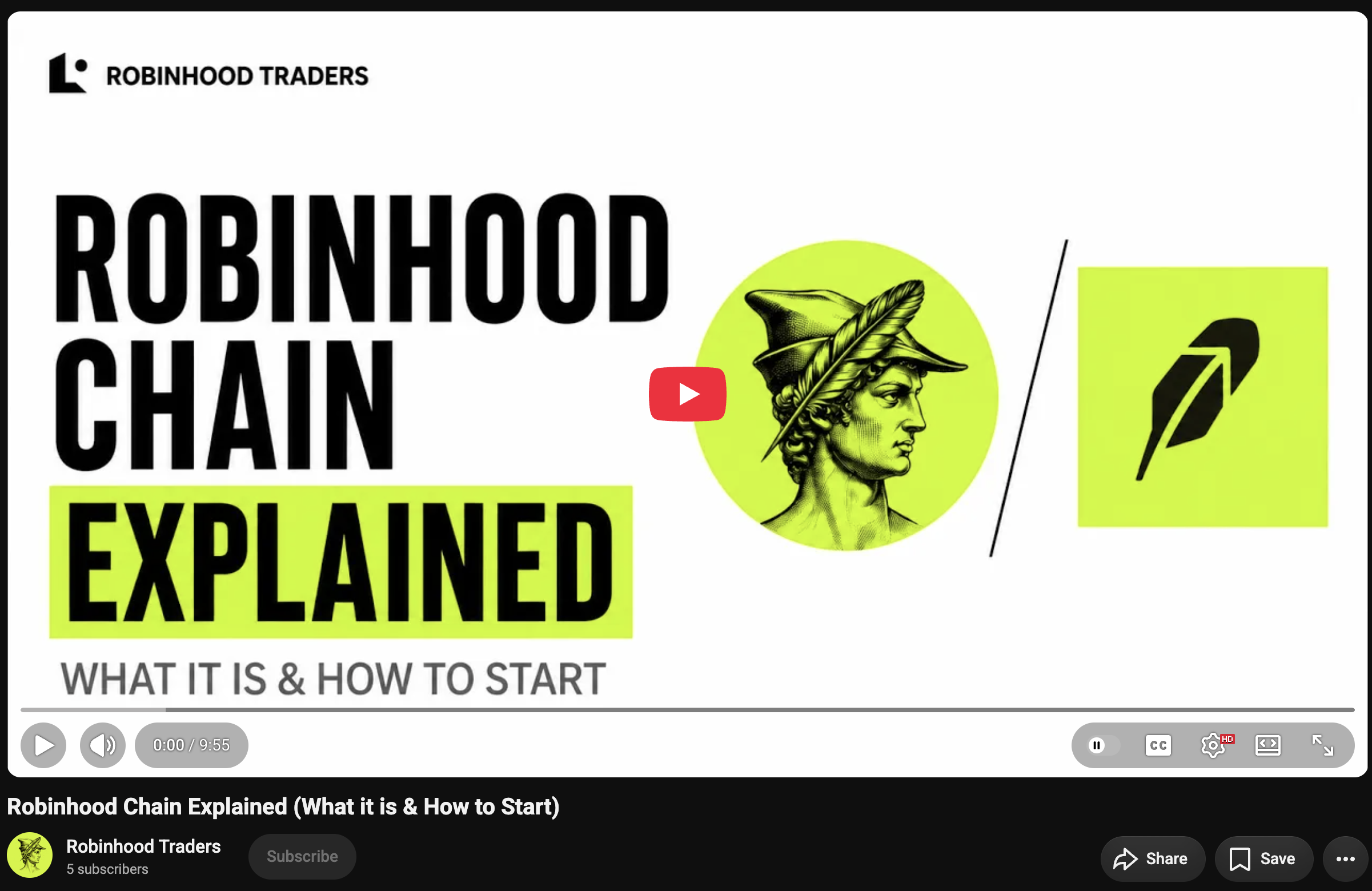
The channel will keep covering Robinhood Chain tutorials, platform reviews, and ecosystem updates as the network grows.
Final Thoughts
The old way of getting onto a new blockchain meant manually adding networks, hunting down a bridge, moving assets, and then finding somewhere else to trade. That method still works, and Across makes it fairly painless. But for most people, Uniswap's cross-chain swap is the easier place to start, since it folds the transfer and swap into one familiar workflow.
After your funds arrive, keep a few simple habits in mind:
Keep some ETH for gas.
Verify every token contract.
Use FOMO for the cleanest overall trading experience.
Use GMGN when you need advanced charts and wallet intelligence.
Treat every newly launched token as high risk.
Robinhood Chain may be built by a familiar company, but using it still means taking responsibility for your own wallet and transactions. Start small, verify everything, and learn the process before you scale up the amount.
Frequently Asked Questions
What wallet works with Robinhood Chain?
Robinhood Chain is Ethereum-compatible, so MetaMask and other compatible EVM wallets can connect using the official network configuration.
What is the Robinhood Chain ID?
The public Robinhood Chain mainnet Chain ID is 4663.
What token pays gas on Robinhood Chain?
Robinhood Chain uses ETH for network fees.
Do I need to bridge to Robinhood Chain?
You need some way to move assets onto the network, but you don't always need a separate bridge website. Uniswap can perform cross-chain swaps that handle the transfer and swap through one interface.
Can I use Across Protocol?
Yes. Across lists Robinhood Chain among the networks supported through its swap and bridge infrastructure.
Is Robinhood Chain the same as the Robinhood app?
No. Robinhood Chain is an open blockchain, while the Robinhood brokerage app is a financial platform operated by Robinhood. Some products may connect the two experiences, but using one isn't the same as using the other.
Are all tokens on Robinhood Chain safe?
No. Anyone can create or launch assets on permissionless infrastructure, so always verify the token contract, liquidity, issuer, and holder distribution.
Where can I trade Robinhood Chain tokens?
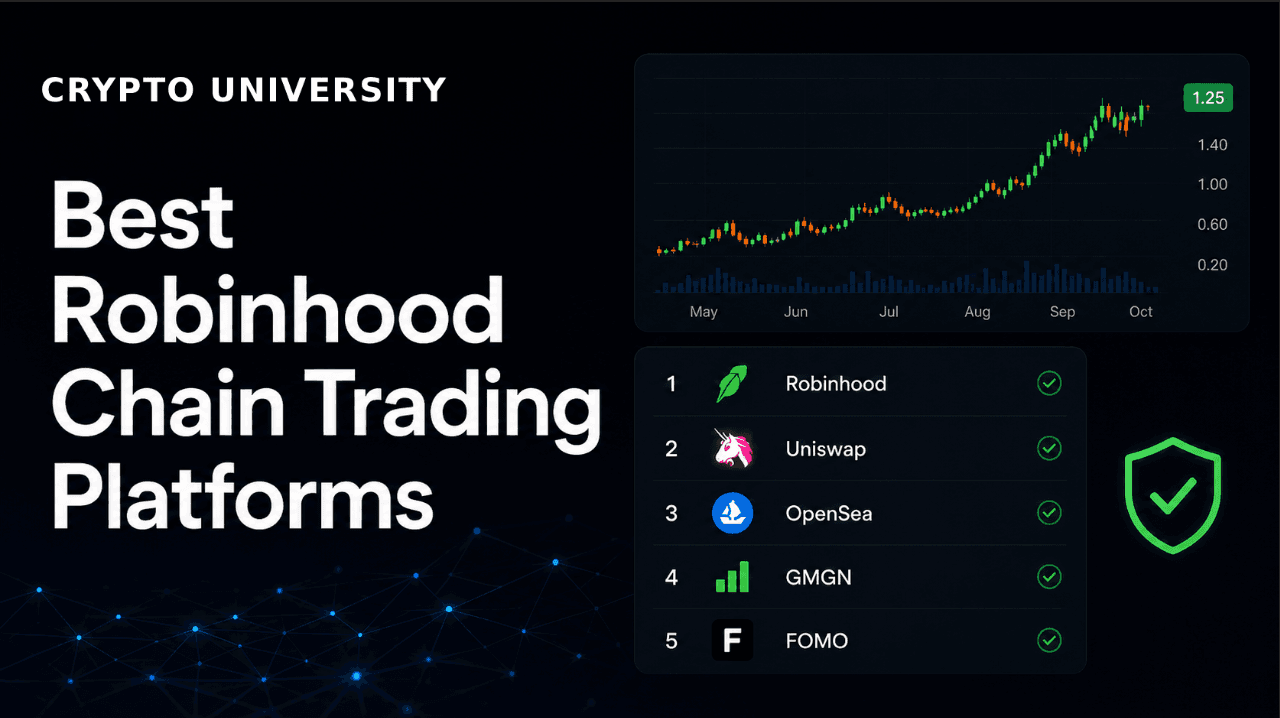
Options include FOMO, GMGN, Uniswap, and OpenSea. For most users we recommend FOMO for the overall experience, while GMGN is better for advanced control and research.
Sources
Robinhood Chain official documentation https://docs.robinhood.com/chain/
Connecting to Robinhood Chain https://docs.robinhood.com/chain/connecting/
Add Robinhood Chain to a wallet https://docs.robinhood.com/chain/add-network-to-wallet/
Robinhood Chain mainnet announcement https://robinhood.com/us/en/newsroom/robinhood-accelerates-global-expansion-robinhood-chain-mainnet-stock-tokens-agentic-trading/
Uniswap is live on Robinhood Chain https://blog.uniswap.org/robinhood-chain-is-live
Uniswap cross-chain swaps https://support.uniswap.org/hc/en-us/articles/43793128689549-What-are-crosschain-swaps
Across Protocol https://across.to/
Across supported chains and contracts https://docs.across.to/chains-and-contracts
Disclaimer: This content is for educational and informational purposes only and is not financial advice. Nothing here is a recommendation to buy or sell any asset or use any platform. Do your own research and manage your risk.
Best Robinhood Chain Trading Platforms in 2026: FOMO, GMGN, Uniswap and OpenSea Compared
Solana Alpenglow Explained: How Votor and Rotor Achieve 100x Faster Finality
MiCA Explained: What the End of the EU Crypto Transition Period Means
How to Verify a Stablecoin's Reserves Yourself (Before the Rules Change)